Evolving Neural Networks
Simbrain provides a comprehensive framework for evolving neural networks using evolutionary algorithms, which is a form of neuroevolution. To experience these in action, try the EvolveXOR simulation or one of the Odor World evolution simulations. Evolution simulations have rich graphical interfaces for running, inspecting, and expressing results, but the evolutionary system itself must currently be built programmatically using the simulation framework. There is not yet a point-and-click GUI for designing new evolutionary simulations from scratch. Instead, the framework provides a library for custom simulations that can evolve networks, odor worlds, and other familiar Simbrain components.
Upon opening most evolutionary simulations, a trainer-style interface appears. It can run one generation at a time, run continuously, stop, open evolution properties, and in some simulations express the current best genome in the workspace. Each generation evaluates a population, scores the members, eliminates a portion of the population, and replaces them with mutated offspring of the survivors. This process continues until the maximum number of generations is reached or the target fitness/error is achieved.
This is a sample which shows what the evolution interface looks like, from the EvolveXOR simulation.
Trainer Controls
- Step: Evolve one generation.
- Run/Stop: Run evolution continuously or pause it.
- Evolution properties: Edit parameters controlling population size, elimination, evaluation, stopping, and random seed.
- Express current best: Visualize the current best genome in the workspace when the simulation supports it.
- Generation: Current generation number.
- Fitness/Error: Current tracked metric, shown at the configured evaluation percentile.
- Fitness plot: Time series display of the tracked metric over generations.
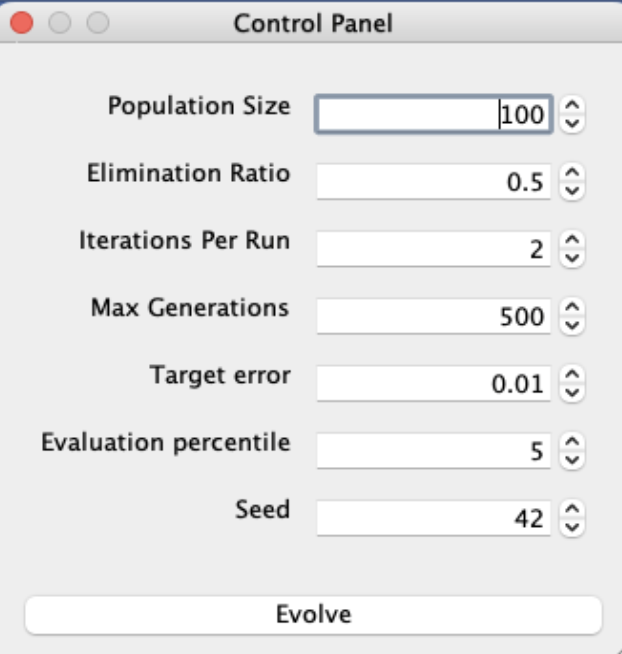
Evolution Parameters
- Population Size: The number of simulations spawned per generation. This size stays constant throughout the evolution process.
- Elimination Ratio: The percentage of the population eliminated each generation and replaced with mutated offspring of surviving simulations.
- Iterations Per Run: Each generation, the simulation is iterated this many times to stabilize the network before calculating a fitness score.
- Max Generations: The maximum number of generations the evolutionary simulation can reach before terminating and returning the best performing network.
- Target Error (or Target Fitness): The target metric that stops the simulation when reached. Depending on the simulation’s stopping condition, this is either a target error (stop when below this value) or target fitness (stop when above this value).
- Evaluation percentile: When deciding whether to terminate, the evolutionary simulation considers the metric at this percentile of the current population. Numbers closer to 0th percentile represent better performance, while numbers closer to 100th percentile represent worse performance.
- Seed: A random seed used for replicability.
Here is how it works:
- Initialization: A population of simulations is created with random initial parameters
- Evaluation: Each simulation runs for a specified number of iterations and receives a fitness score
- Selection: Simulations with better fitness scores are more likely to survive (see evolutionary selection)
- Reproduction: Surviving simulations produce offspring with mutations
- Iteration: Steps 2-4 repeat until a termination condition is met
Gene and Chromosome Displays
Evolution simulations include a graphical display of the genes and chromosomes in the current best genome. These displays group related genes into sections, show the values that will be expressed into networks or world entities, and can include metadata such as generation or ancestry.
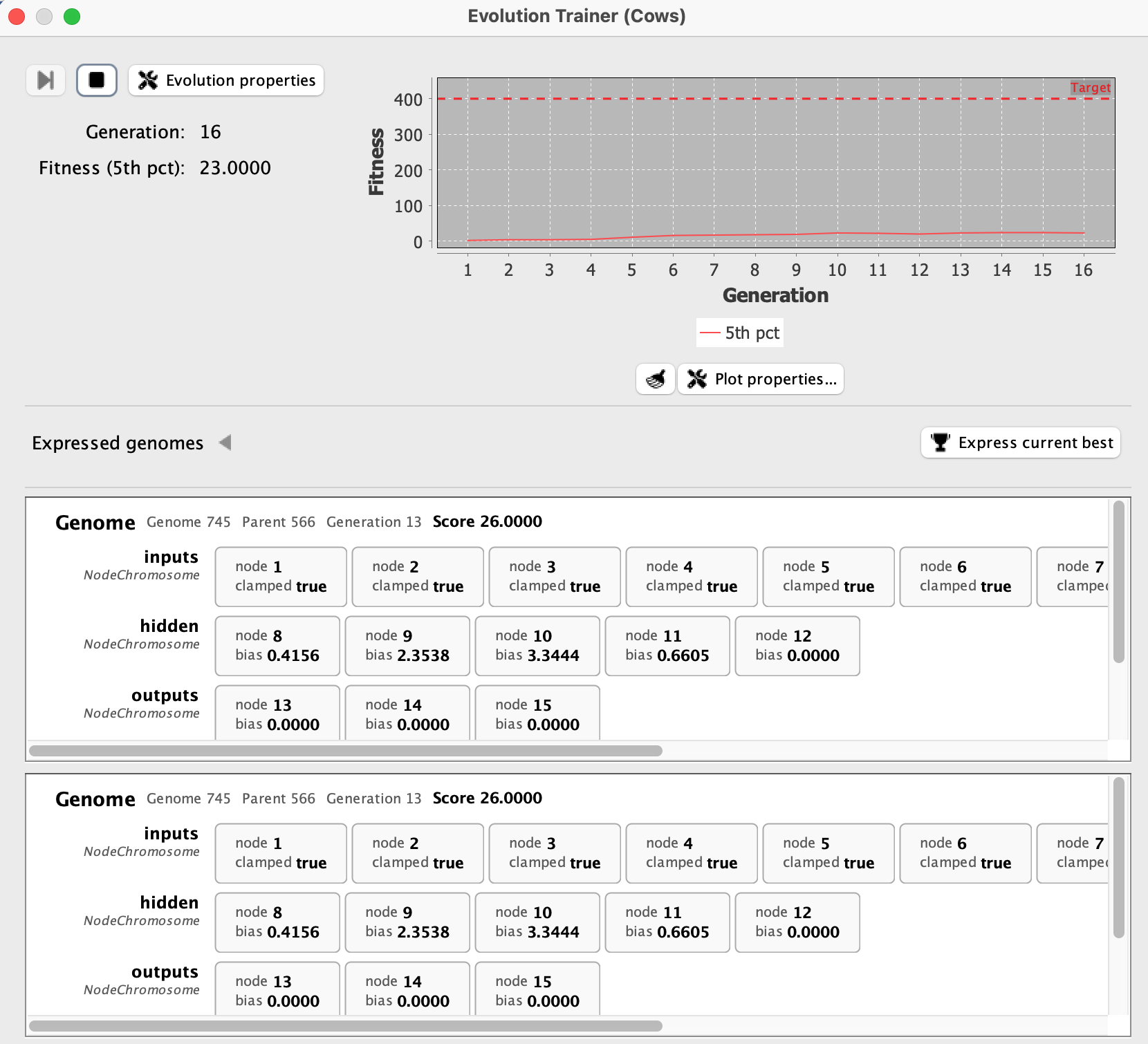
The display updates as evolution proceeds, so it can be used to inspect which traits are changing across generations. In simulations with an Express current best button, the displayed genome can also be expressed into visible Simbrain components, making it easier to connect the abstract gene values to the network or agent they produce.
Example Simulations
Here are some example evolutionary simulations available in Simbrain:
EvolveXOR
A classic demonstration of evolving a network to solve the XOR problem. The fitness function rewards networks that correctly compute XOR for all input combinations.
To run:
- Open the EvolveXOR simulation from the simulations menu
- Adjust parameters as desired
- Click “Evolve” to start the evolutionary process
- Watch as generations improve their ability to solve XOR
Odor World Evolution
Networks can be evolved to control agents in odor worlds. The fitness function typically rewards:
- Finding food sources
- Avoiding obstacles or threats
- Efficient movement patterns
- Complex behaviors like exploration
These simulations demonstrate how evolutionary algorithms can discover control strategies without explicit programming.
Creating Custom Evolutionary Simulations
To create your own evolutionary simulations:
- Define a fitness function that evaluates simulation performance
- Specify what parameters or structures should be evolvable
- Set up mutation operators that create variation
- Configure the evolutionary parameters (population size, mutation rates, etc.)
- Run the evolution and analyze results
See Simulations and Scripting for implementation details.
Advanced Features
Network Structure Evolution
Beyond evolving connection weights, Simbrain’s evolution framework can:
- Add or remove neurons
- Modify connection patterns
- Change neuron types and update rules
- Adjust learning parameters
This enables evolution of both network topology and parameters simultaneously.
Multi-Objective Evolution
Some simulations support optimizing multiple objectives:
- Speed vs. accuracy trade-offs
- Energy efficiency vs. performance
- Robustness vs. specialization