3D World
View3DSensor provides first-person 3D rendering of an OdorWorld scene from an agent-centered viewpoint using classic ray casting. It is not a separate Simbrain world component. It is a sensor in Odor World that exposes image-like outputs for coupling. The sensor also renders a configurable wall and sky and so it packs a 3d environment into a single sensor. Shown below is a sensor output showing the first-person image brightness values coupled to an Image world.
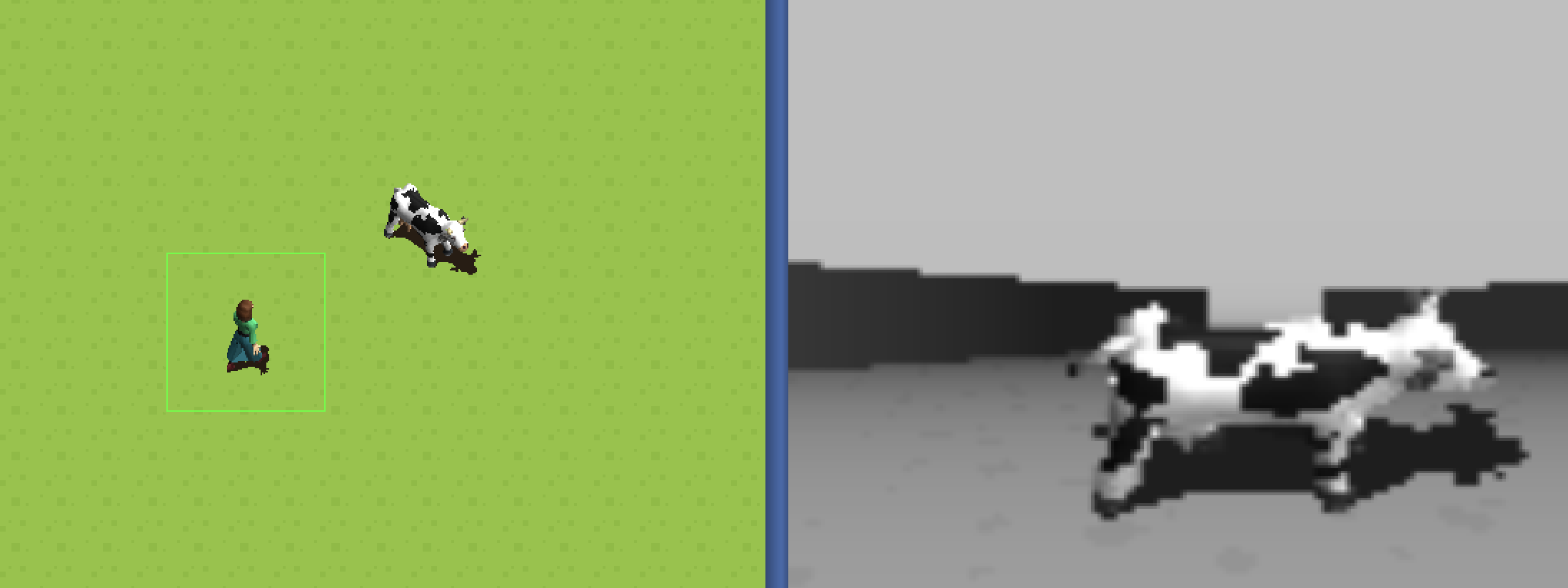
This approach allows for 3d simulations without a heavyweight 3d library, which is well-suited to the goals of Simbrain.This keeps experiments fast and practical for standard desktop machines while still supporting embodied visual tasks. The output can be configured as relatively small pixel arrays, then coupled directly to neural networks.
Conceptually, the sensor asks: if the camera were at this location, facing this heading, with this field of view, what would it see? It then uses ray casting in the 2D world to estimate visible walls, floor, and sprites and reconstruct a first-person image from that point of view. Internally this is rendered as a buffered image with RGBA channels.
To get a feel for how this works, try Simulations > Vision > 3D Navigation and Image World, 3D Object Recognition, or 3D Navigation and Lateral Inhibition.
Sensor Parameters
The 3D sensor exposes these user-editable parameters in the sensor dialog:
- Field of View: Horizontal field of view in degrees
- View Distance: Maximum render distance in pixels
- Width: Output image width in pixels
- Height: Output image height in pixels
- Horizon Position: Vertical horizon location in the rendered image
- Camera Height: Camera height above ground
- Wall Height: Height of boundary walls relative to camera height
- Billboard Sprites: If enabled, sprites always face the camera
- Sky Color: Color of the sky or ceiling region
- Wall Color: Base color used for boundary walls
It also supports the common relative-location sensor properties from OdorWorld:
- Label: Shows up in the coupling menu and can be used to identify the sensor
- Sensor Angle: Determines the angle from the agent’s center of perspective at which the sensor is placed
- Sensor Length: Determines the distance from the agent’s center to the sensor location
Coupling Outputs
View3DSensor can produce:
- Brightness (default visible producer): Per-pixel grayscale intensity computed from the rendered image
- Red: Per-pixel red channel values from the rendered image
- Green: Per-pixel green channel values from the rendered image
- Blue: Per-pixel blue channel values from the rendered image
Each output is a flattened array of size Width * Height.
For grid-style neuron arrays or collections, dimensions should match the sensor output shape to get reasonable output. For example, a 10 x 10 sensor output (Width=10, Height=10) should be coupled to a 100-neuron square array.