Supervised Models
An innovative feature in Simbrain 4, the ability to train arbitrary collections of neuron arrays, collections, or groups linked via weight matrices or synapse groups.
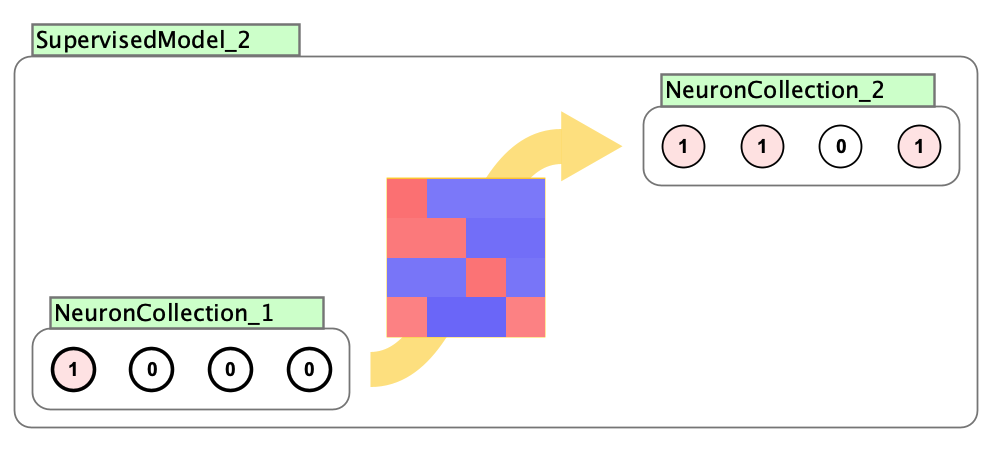
Using the source-target format, a source set of neurons is connected to a target set of neurons and using ctrl/command-M a supervised model is added and it can be trained on the fly. The neurons must be connected by weight matrices or synapse groups.
Supervised models are lightweight wrappers that automatically find a path from the source to the target through the network connections. The model finds all paths between the source (red selection) and target (green selection), including multiple paths and skip connections, then trains using backpropagation along those paths. All paths are automatically computed and trained simultaneously.
How to create a supervised model
- Create two neuron arrays or neuron collections (henceforth “neurons”)
- Connect them using 1-2 or 1-3
- Select the input neurons interaction box and click
1 - Select the target neurons interaction box and right click and select
create supervised model - A box should appear showing the model
Apply Immediate Learning
Supervised models support “immediate learning”, which allows you to instantly train an association between the current source and target activations. Simply create the model, press L, and the network learns by one increment, treating the current activations of the source and target as a single training example. You can see the association form visually as the weight matrix colors change with each learning step. Repeatedly press L to continue training the association.
Data Import and Export
The File menu contains commands for importing and exporting training data:
- Export Data to CSV: Export the input and target data to a CSV file
- Import Data from CSV: Import data from a CSV file
The ARFF file format (Attribute-Relation File Format) is also supported for import, but CSV is the recommended format.
Training
When the play button is pressed in the training panel, the supervised model trains on the data in the table. The input table rows are fed in as activations of the source neurons (sequentially or randomly depending on the update type setting), the network is iterated to compute outputs, activations in the target neurons are compared with values in the target table, and the network weights are updated using backpropagation. The process continues until a stopping condition is reached or training is manually stopped.
For details on training parameters (loss functions, optimizers, update types, stopping conditions, etc.), see Training Parameters.