Simple Recurrent Network
A Simple Recurrent Network (SRN) or Elman Network is a type of recurrent network useful for discovering patterns in temporally extended data. They are variants on a backprop network that include a context layer maintaining a memory of the previous hidden layer state. This memory allows the network to learn temporal dependencies and predict what item will occur next in a sequence of patterns.
To see an SRN in action, try the Language Models > Next Word Prediction or Backprop > XOR in Time simulations. Or create the default SRN using Insert > Add subnetwork > SRN (simple recurrent network). The default network is preloaded with a dataset that associates each pattern with a shifted version of it. If you train this network and then test it, you should see the input move to the right and the output predict what the next input will be.
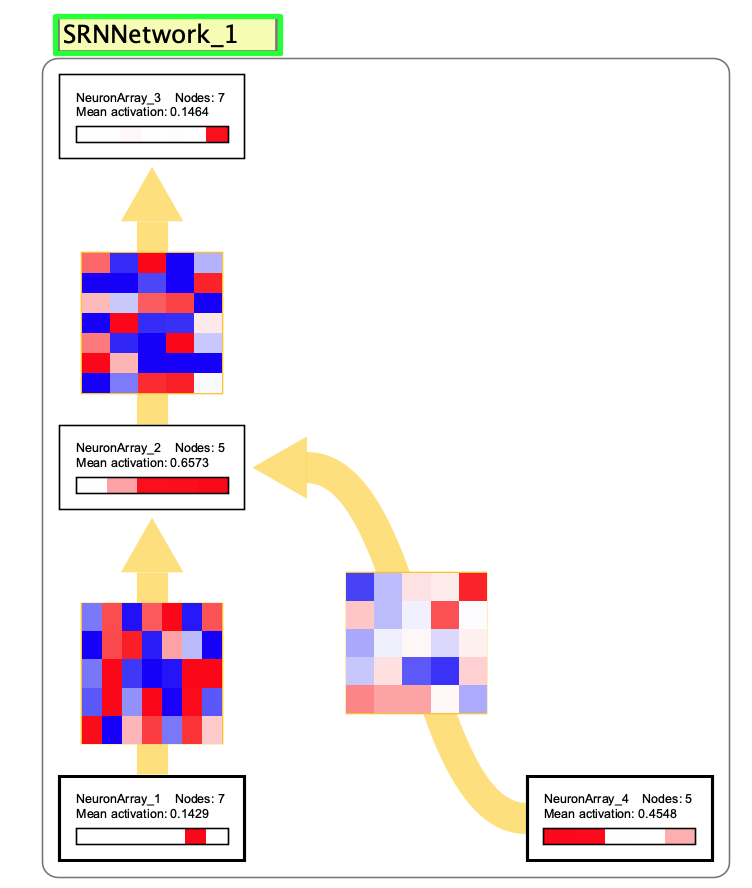
You can also just create an SRN and train it on its default “bouncing” dataset. These require the network to learn a one-step prediction task. The network learns to predict the next pattern in a sequence where a single active unit bounces back and forth across the input vector (e.g., (1,0,0) > (0,1,0) > (0,0,1) > (0,1,0) > (1,0,0)). This demonstrates how SRNs handle temporal context: the same input pattern (0,1,0) must produce different outputs depending on what came before. The network resolves this ambiguity using its context layer, which maintains different hidden states depending on the temporal history. This type of auto-regressive learning is common in machine learning and has the advantage of requiring no labeled data, since the target at each timestep is simply the next item in the sequence.
History
According to this site: “The Simple Recurrent Network (SRN) was conceived and first used by Jeff Elman, and was first published in a paper entitled Finding structure in time (Elman, 1990). The paper was ground-breaking for many cognitive scientists and psycholinguists, since it was the first to completely break away from a prior commitment to specific linguistic units (e.g. phonemes or words), and to explore the vision that these units might be emergent consequences of a learning process operating over the latent structure in the speech stream. Elman had actually implemented an earlier model in which the input and output of the network was a very low-level spectrogram-like representation, trained using a spectral information extracted from a recording of his own voice saying ‘This is the voice of the neural network’. We will not discuss the details of this network, except to note that it learned to produce this utterance after repeated training, and contained no explicit feature, phoneme, syllable, morpheme, or word-level units.”
Training
Training an SRN involves specifying input data, target data, and then running the backpropagation algorithm. The general process is covered in Supervised Learning. Double-click the interaction box to open the training dialog.
The key difference from standard backprop networks is that SRNs process temporal sequences. A given input to an SRN occurs after previous patterns, and the context layer maintains a memory of the previous hidden layer state. For example, in the srn_temporalXOR.zip workspace, a network has been trained to perform a logical exclusive or in time. An input of 1 after a 0 should produce a 1, but the same input of 1 after another 1 should produce a 0. The network learns to use the context layer to remember what came before. Again, the default “bouncing” dataset created with a new SRN illustrates this idea.
Creation Dialog
When creating an SRN network, you specify:
- Number of inputs: Number of input nodes.
- Number of hidden: Number of hidden nodes (also determines the number of nodes in the context layer, which is the same size).
- Number of outputs: Desired number of output nodes.
By default, hidden and output layers use sigmoidal neurons, while the input and context layers use linear neurons. The context layer is initialized with activations of 0.5.
Right Click Menu
Common right-click items are described on the subnetwork page.
- Edit / Train SRN: Opens the training dialog to train the SRN network.