Supervised Learning
Supervised learning involves training networks using input and output data pairs. An input vector is fed into a network and compared with the output vector that results. The errors that occur are propagated backwards through the network, updating the weights using algorithms like backpropagation.
Training Interface
Most supervised learning in Simbrain is handled through a training dialog with a common structure:
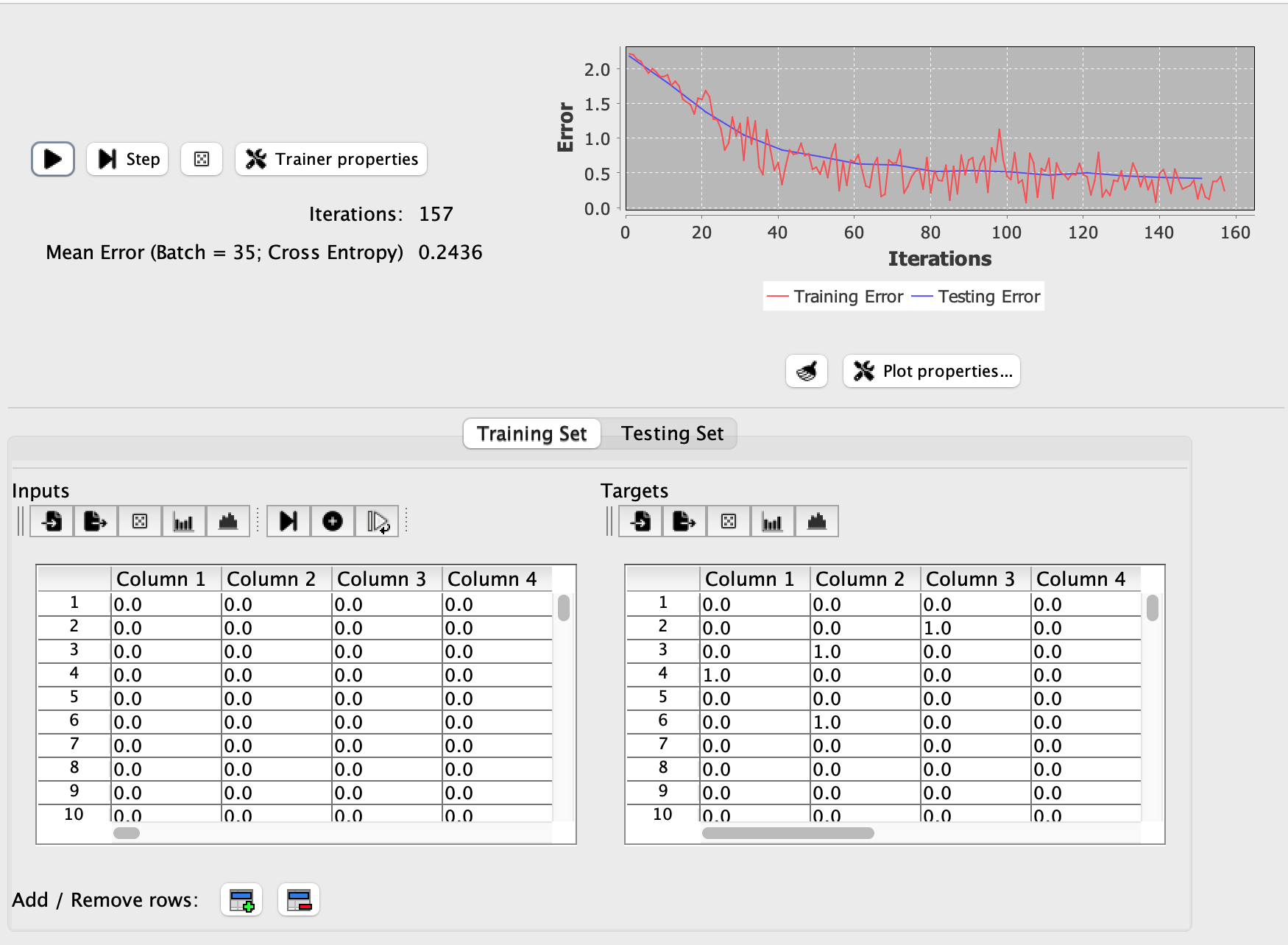
Notice that the testing error is smoother. This is discussed in the discussion of Testing below.
The dialog contains three main areas:
-
Training controls and parameters at the top for configuring the training algorithm. See Training Parameters for details on loss functions, optimizers, stopping conditions, and other settings. The iteration counter shows training progress and can be reset to 0 by double-clicking on it.
- Training and testing tabs in the middle showing progress:
- Training tab: Displays training progress including current iteration, error/loss values, and accuracy (if enabled).
- Testing tab: When test data is provided, displays validation metrics to monitor generalization performance.
- Data tables at the bottom showing the training data, which can be edited and analyzed using Simbrain data tables
A play button initiates training, which continues until a stopping condition is reached or training is manually stopped.
This dialog appears when training various types of subnetwork or when using supervised models created on the fly.
Supervised Learning Methods
In Simbrain, the main approaches for supervised learning are:
- Supervised Models: A flexible framework for training arbitrary collections of neuron arrays and groups connected by weight matrices or synapse groups
- Backprop Networks: Traditional feedforward networks trained with backpropagation
- Classifiers: Trained in one go rather than iteratively
Training Data
Training set data is displayed in two tables:
- Input data (also called sample or test data): Patterns fed into the network
- Target data (also called labels or desired values): The outputs the network should produce
The training dataset should contain examples of all patterns you want the network to learn. For example, if you are building a classifier for different types of fruit images, you need many images of each type of fruit in the dataset.
Columns correspond to neurons and rows correspond to training examples. If a network has 3 input nodes and 2 output nodes, then the input table will have three columns and the target table will have 2 columns. The input and target tables must have the same number of rows, and each input/target row pair is a single training example.
Each row of the input data table is an input vector, and the corresponding row of the target data table is the desired output vector that should be produced for that input if training is successful.
The training data is viewed in a table, which provides operations for editing, analyzing, and visualizing training data.
Testing
Testing data is used to evaluate how well the network generalizes to unseen examples during training. When test data is provided and test configuration is enabled, the network is periodically evaluated on the test set and the results are displayed in the testing tab.
Testing always evaluates the entire test set in an epoch-based manner, averaging over all test examples. In contrast, training error depends on the selected update type. When training uses batch or stochastic updates, only a subset of examples is processed per iteration, making the training error appear more jagged as it fluctuates based on which examples were selected
The testing error curve typically appears smoother than the training error curve. This happens due to the the fact that testing occurs at regular intervals (controlled by the test frequency parameter), and due to epoch-based update, noted above. This smoothness difference is normal and expected. The smooth test curve provides a stable, reliable measure of generalization performance, while the noisier training curve reflects the iterative nature of the learning process.