Synapse Adjustment Dialog
This is the main dialog for adjusting collections of weights. The dialog is invoked by selecting a group of weights and clicking ctrl/cmd-R or in association with a synapse group.
The top part of this dialog shows a statistics panel for the selected set of synapses. The tabbed panels can be used to adjust the synapses in various ways, in each case by pressing an Apply button. Changes are shown immediately in the statistics panel.
Note: If applied to weights whose source neuron is excitatory or inhibitory and thus shows up with a red or blue border (see polarity), changes made in the panel can be “flipped” to respect that neuron’s polarity constraint. Thus, for example, if you set the weights on a fully connected set of inhibitory neurons to a distribution with mean 1, the result will be a distribution of weights with mean -1.
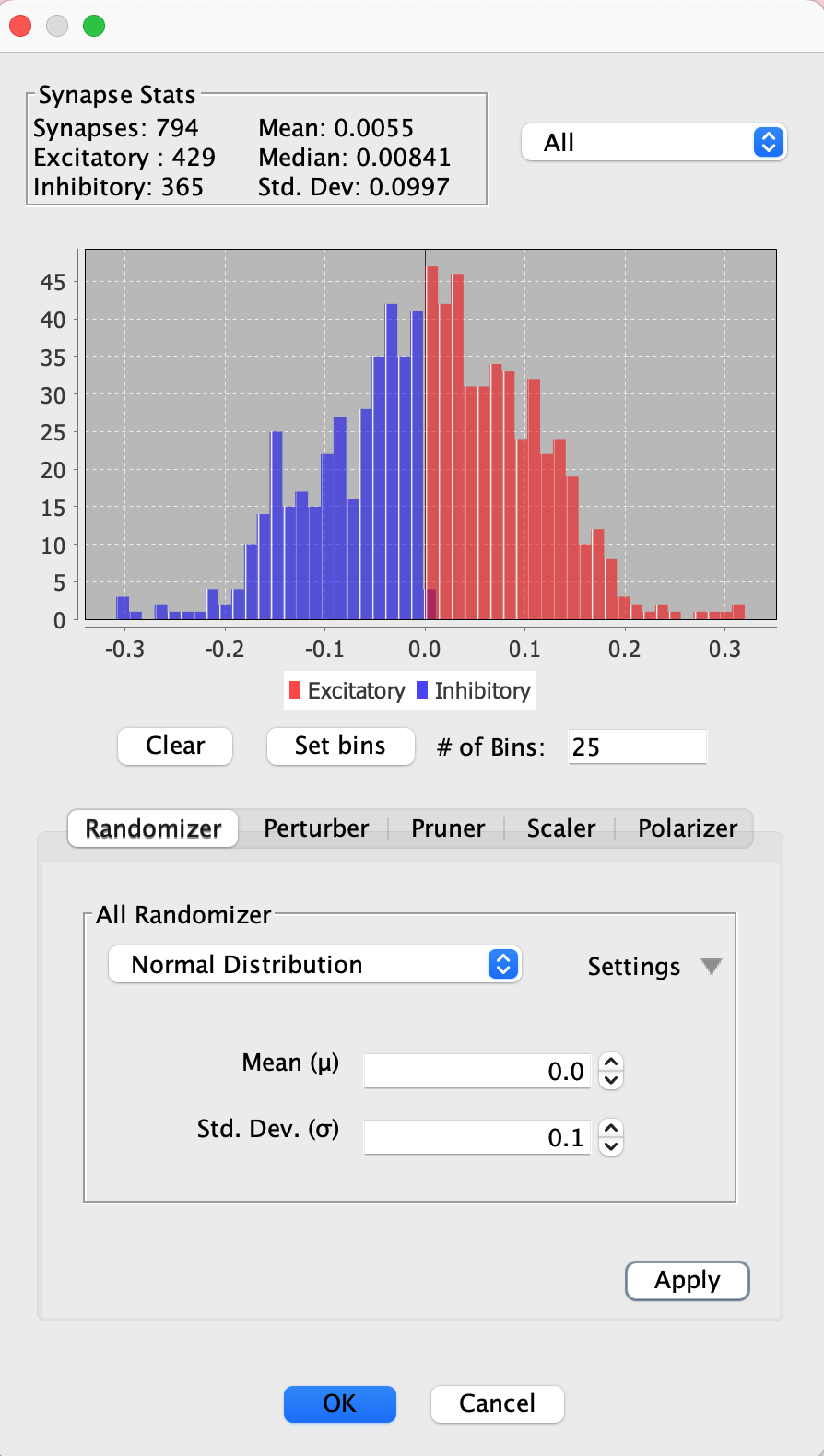
Statistics Panel
The top part of the adjust synapses tab shows basic statistics about a populations of synapses, including a histogram. The histogram and stats can be configured to focus on excitatory, inhibitory, or both kinds of synapse:
- Both: Show all synapses, regardless of whether they are excitatory or inhibitory, and modify all at once.
- Overlay: If “Overlay” is selected, it will display these values for all synapses in the group, using the absolute value of all inhibitory weight values.
- Excitatory: Show only weights with strength above 0.
- Inhibitory: Show only weights with strenth below 0.
Randomizer
Use a randomizer to select a probability distribution and use it to set weight strengths.
Perturber
Use a randomizer to select a probability distribution and use it to add values to weight strengths.
Pruner
Remove all synapses whose absolute value is below the provided threshold by pressing the prune button. For example, if the threshold is \(.25\) and a weight is \(.1\) or \(-.1\), it will be removed.
Scaler
Scale all synapse values up or down by changing their strengths as much as the indicated percentage.
E/I Ratio Adjuster
Change the set of weight signs to have the indicated ratio of excitatory to inhibitory. This tool adjusts the signs of individual synapse strengths (making them positive or negative) to achieve the target ratio. The tool respects the polarity constraints of source neurons: excitatory and inhibitory neurons always maintain their polarity, and the ratio is achieved by adjusting weights from nonpolar neurons. See Excitatory/Inhibitory Ratio.
Working with Connection Strategies
How you use this dialog depends on how your connections were created. Some connection strategies set weights to fixed values (1 or -1), while others apply probability distributions during connection creation. To preserve the excitatory/inhibitory ratio when adjusting weights, select excitatory or inhibitory in the statistics panel dropdown to modify each population separately.
Connection strategies use weight initializers to set initial synapse strengths. You can use this dialog to further adjust those weights after creation.